Faýl sanawy
Create a diagram from text with AI
- In the file list, select Text input under Create new with AI.
- Paste the source text or describe the diagram you need, such as “Make a flowchart showing the steps for onboarding a new employee,” then select OK.
- Review the resulting diagram. You can ask for a format that fits the task, such as a flowchart for a process or a mind map for organizing ideas.
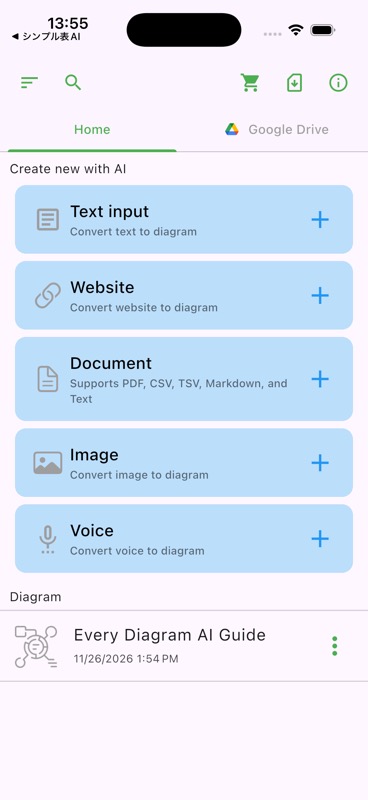
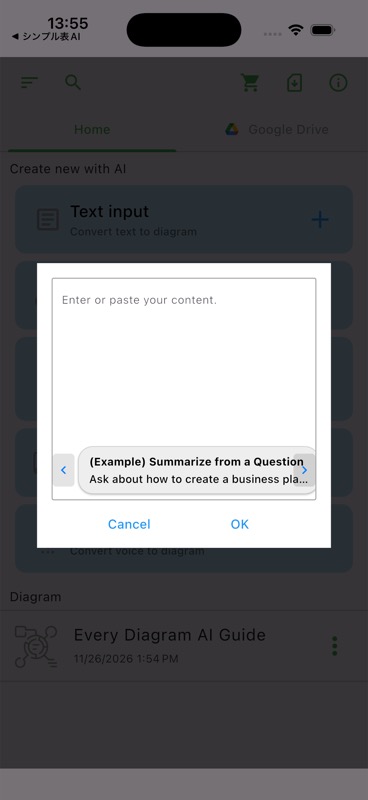
Create a diagram from a document, image, website, or voice input
- Under Create new with AI in the file list, choose Document, Image, Website, or Voice.
- Select the file or image, enter the page URL, or provide voice input. Check that the diagram preserves the source’s sequence or key ideas.
Faýllaryň tertipleme yzygiderliligini üýtgetmek
- Faýl sanawynyň ýokarsyndaky tertipleme dolandyryşyny ulanyň. Kiçi ekranda tertipleme menýusyny açyň.
- Üýtgedilen senesi ýa-da faýlyň ady boýunça tertiplemegi saýlaň.
Search for a file by name
- Open Home or Google Drive, depending on where the file is stored, and select the Search icon.
- Enter part of the name in Search by file name. Select Close to see the full list again.
Faýlyň nusgasyny döretmek
- Faýlyň üç nokatly menýusyny açyň we «Nusgasyny döret» opsiýasyny saýlaň.
- Asyl faýly saklap galmak bilen redaktirlemek üçin sanawa goşulan nusgany açyň.
Faýly pozmak
- Faýlyň üç nokatly menýusyny açyň we «Poz» opsiýasyny saýlaň.
- Tassyklama habaryny barlaň we OK saýlaň.
Siziň bilen paýlaşylan faýl üçin menýuda paýlaşmagy ýatyrmak opsiýasy bolup biler.
Faýlyň adyny üýtgetmek
- Faýlyň üç nokatly menýusyny açyň we Adyny üýtget saýlaň.
- Täze ady giriziň we tassyklaň.
Siziň bilen paýlaşylan Google Drive faýlynyň adyny üýtgetmek üçin redaktirleme rugsady gerek.
Import a Mermaid diagram
- Select Import in the file list and select OK to open the file picker.
- Choose a Mermaid file (.mermaid or .mmd), then open it from the file list.
Save an AI-generated file to Google Drive
- Choose Google Drive in the file list and sign in to your Google Account if prompted.
- With the Google Drive tab open, create a file using Create new with AI. To move a local file, select Move to Google Drive from its three-dot menu if the option is available.
Faýly başga enjamda açmak üçin ony ýatda saklamakda ulanan Google hasabyňyzy birikdiriň.
Faýllary enjamyňyz bilen Google Drive arasynda geçiriň
- Gurnalan programmada Google hasabyňyzy birikdiriň we faýlyň üç nokatly menýusyny açyň.
- Faýlyň saklanýan ýerine baglylykda Google Drive-a geçir ýa-da Baş sahypa geçir saýlaň we tassyklaň.
Faýllary redaktirlemek
Revise a diagram with AI
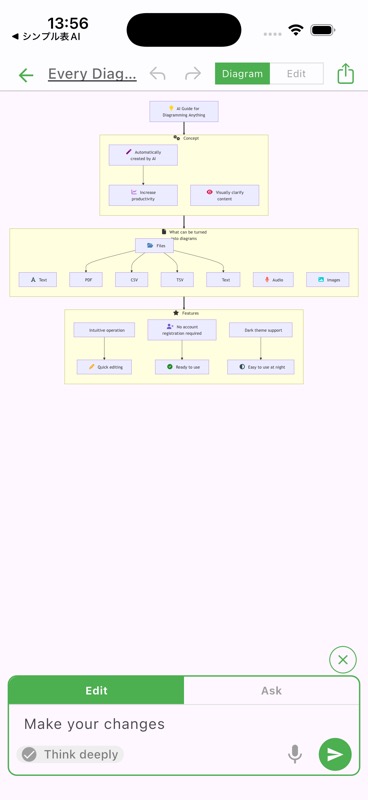
- Choose Diagram at the top of the editor, tap the field at the bottom, and choose Edit.
- Enter a change such as “Add a branch for requests that are not approved” and select Send. Check that the diagram reflects the change.
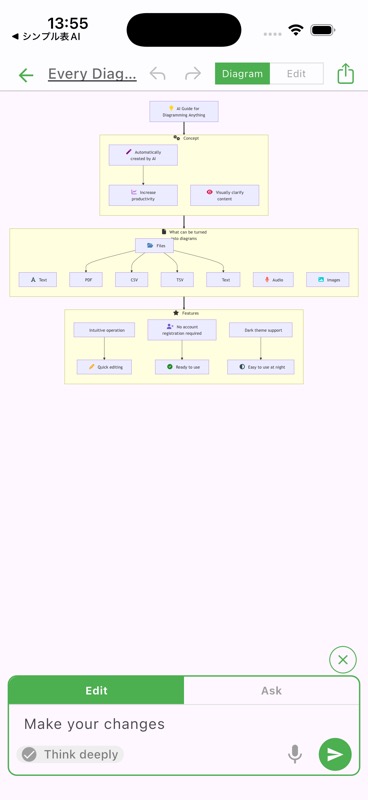
Ask AI a question about the diagram
- Choose Diagram, tap the input field at the bottom, then choose Ask.
- Send a question such as “Explain the relationships in this diagram” and read the reply in the chat window.
Edit a diagram’s Mermaid source
- Choose Edit at the top of the editor and modify the Mermaid source.
- Switch back to Diagram and check the updated rendering.
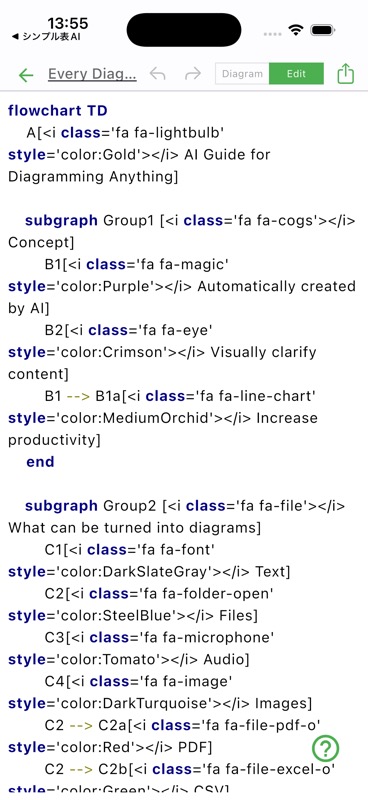
Export the diagram as an image, Mermaid, or HTML
- Select the share icon in the top-right corner of the editor.
- Choose an image to place the diagram in another document, Mermaid (.mermaid) to edit the source later, or HTML to open the file in a browser.
Satyn almalar
Tölegli meýilnamany satyn almak
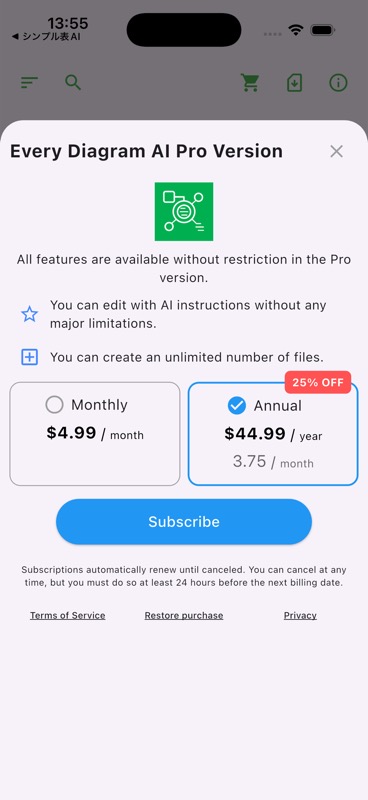
- Faýllaryň sanawyndaky söwda sebediniň nyşanyny saýlaň.
- Satyn alyş ekranyndaky meýilnamalary we bahalary gözden geçiriň, soňra satyn almak isleýän meýilnamaňyzy saýlaň.
Satyn alşy dikeltmek
- Programma dükany arkaly satyn alan bolsaňyz, meýilnamany satyn almak üçin ulanan dükan hasabyňyza giriň.
- Programmadaky satyn alyş ekranyny açyň, «Satyn alyşlary dikeltmek» opsiýasyny saýlaň we netijäni barlaň.
Satyn alşy ýa-da abunalygy dolandyrmak
- Faýllaryň sanawyndaky maglumat menýusynda satyn alşy dolandyrmak opsiýasy bar bolsa, ony açyň.
- Abunalygyňyzy gözden geçirmek ýa-da ýatyrmak üçin meýilnamany satyn alan dükanyňyzy ýa-da hyzmatyňyzy ulanyň.
Tölegli hasap
Satyn alşyňyzy Google hasabyna baglamak
- Satyn alşyňyzyň işjeň bolan enjamynda Google hasabyňyza giriň.
- Menýuda satyn alşyňyzy Google hasabyna baglamak opsiýasy görünse, ony saýlaň we hasaby tassyklaň.
- Tölegli meýilnamaňyzy goldanylýan başga enjamda ulanmak üçin baglanan Google hasabyňyza giriň.
Google hasaplaryny çalyşmak
- Faýllaryň sanawyndaky maglumat menýusyndan haýsy Google hasabynyň işjeňdigini barlaň.
- Hasapdan çykmak opsiýasy bar bolsa, ony saýlaň, soňra Google Drive-y açyň we ulanmak isleýän hasabyňyza giriň.
Başga enjamda satyn alşyňyz ýa-da girmek isleýän Drive faýllaryňyz bilen baglanyşykly hasaby ulanyň.