Ndepụta faịlụ
Create a sequence diagram file
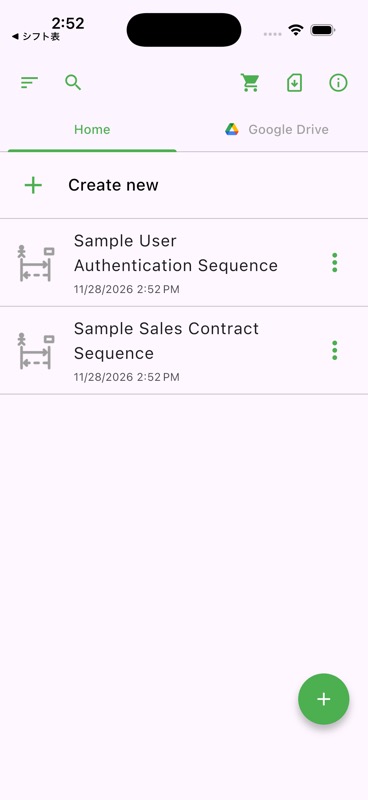
- Select + Create new in the file list.
- Enter a name and select OK to open the sequence diagram editor.
Ịgbanwe usoro nhazi faịlụ
- Jiri njikwa nhazi dị n'elu ndepụta faịlụ. Na obere ihuenyo, mepee menu nhazi.
- Họrọ ịhazi faịlụ site n'ụbọchị e mezigharịrị ha ma ọ bụ aha faịlụ.
Search for a file by name
- Open Home or Google Drive, depending on where the file is stored, and select the Search icon.
- Enter part of the name in Search by file name. Select Close to see the full list again.
Imegharị faịlụ ka ọ bụrụ oyiri
- Mepee menu ntụpọ atọ nke faịlụ ahụ ma họrọ Mepụta oyiri.
- Mepee oyiri agbakwunyere na ndepụta ahụ ka ị dezie ya ma debe faịlụ mbụ.
Ihichapụ faịlụ
- Mepee menu ntụpọ atọ nke faịlụ ahụ ma họrọ Hichapụ.
- Lelee ozi nkwenye ahụ ma họrọ OK.
Maka faịlụ e kesara gị, menu ahụ nwere ike igosi nhọrọ iwepụ nkekọrịta ahụ.
Ịgbanwe aha faịlụ
- Mepee menu ntụpọ atọ nke faịlụ ahụ, họrọ Gbanwee Aha.
- Tinye aha ọhụrụ ahụ ma kwado ya.
Ị ga-enwerịrị ikike idezi iji gbanwee aha faịlụ Google Drive e kesara gị.
Import a Mermaid diagram
- Select Import in the file list and select OK to open the file picker.
- Choose a Mermaid file (.mermaid or .mmd), then open it from the file list.
Chekwaa na Google Drive
- Họrọ Google Drive na ndepụta faịlụ ma soro ntụziaka iji jikọọ akaụntụ Google gị.
- Mepụta faịlụ ọhụrụ site na ndepụta Google Drive. Ọ bụrụ na nhọrọ ahụ dị, ị nwekwara ike ibuga faịlụ dị na ngwaọrụ gị gaa na Google Drive site na menu ntụpọ atọ ya.
Iji mepee faịlụ ahụ na ngwaọrụ ọzọ, jikọọ akaụntụ Google i ji chekwaa ya.
Bugharịa faịlụ n'etiti ngwaọrụ gị na Google Drive
- N'ime ngwa arụnyere na ngwaọrụ gị, jikọọ akaụntụ Google gị ma mepee menu ntụpọ atọ nke faịlụ ahụ.
- Họrọ Bugharịa gaa na Google Drive ma ọ bụ Bugharịa gaa na Ụlọ, dabere n'ebe echekwara faịlụ ahụ, ma kwado ya.
Idezi faịlụ
Describe participants and their messages to create a sequence diagram
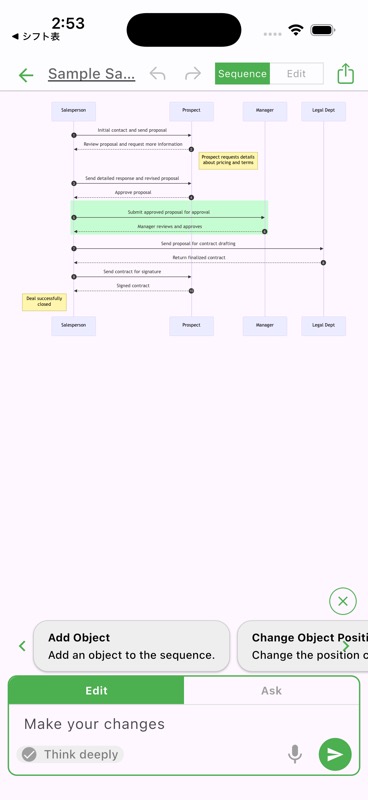
- Open Sequence at the top, tap the input field at the bottom, and choose Edit.
- Describe the participants and messages in order. For example, “The customer sends an order to the store. The store checks stock with the warehouse, then confirms the order to the customer.” Select Send.
- Review who sends each message and check the direction and order of the arrows.
Ask AI about the sequence diagram
- On Sequence, tap the input field at the bottom and choose Ask.
- Send a question such as “Who does the store contact after checking stock?” and read the reply in the chat window.
Edit participants and messages in Mermaid
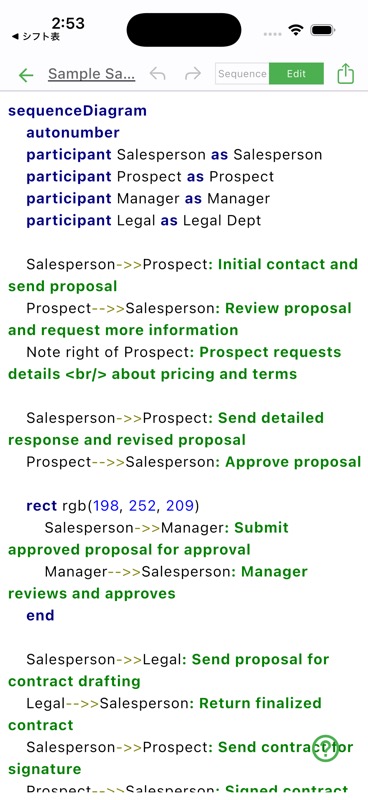
- Choose Edit at the top to open the Mermaid source.
- Update participant names, message text, or message order. Switch back to Sequence to check the diagram.
Export the diagram as an image, Mermaid, or HTML
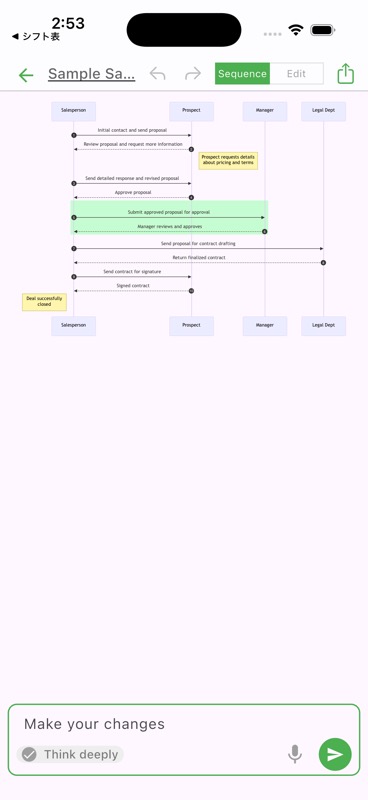
- Select the share icon in the top-right corner of the editor.
- Choose an image to place the diagram in another document, Mermaid (.mermaid) to edit the source later, or HTML to open the file in a browser.
Ịzụ ihe
Ịzụta atụmatụ a na-akwụ ụgwọ
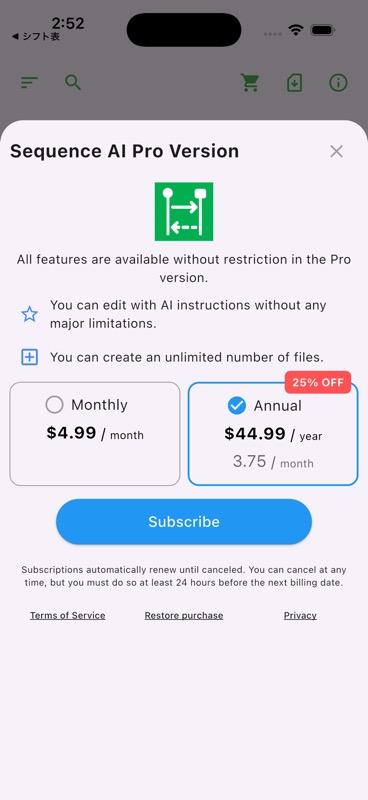
- Họrọ akara ngosi ụgbọ ịzụ ahịa na ndepụta faịlụ.
- Lelee atụmatụ na ọnụahịa dị na ihuenyo ịzụta, họrọzie atụmatụ ị chọrọ ịzụta.
Iweghachi ihe a zụtara
- Ọ bụrụ na ị zụtara atụmatụ ahụ n'ụlọ ahịa ngwa, jiri akaụntụ ụlọ ahịa i ji zụta ya banye.
- Mepee ihuenyo ịzụta n'ime ngwa ahụ, họrọ “Weghachi ihe ndị a zụtara”, wee lelee nsonaazụ ya.
Ijikwa ihe a zụtara ma ọ bụ ndenye aha
- Ọ bụrụ na menu ozi dị na ndepụta faịlụ nwere nhọrọ ijikwa ihe a zụtara, mepee ya.
- Jiri ụlọ ahịa ma ọ bụ ọrụ i si zụta atụmatụ ahụ lelee ma ọ bụ kagbuo ndenye aha gị.
Akaụntụ a na-akwụ ụgwọ maka ya
Ijikọ ihe ị zụtara na akaụntụ Google
- Banye n'akaụntụ Google gị na ngwaọrụ ebe ihe ị zụtara ka dị irè.
- Ọ bụrụ na nhọrọ ijikọ ihe ị zụtara na akaụntụ Google pụtara na menu, họrọ ya ma kwado akaụntụ ahụ.
- Iji atụmatụ ị na-akwụ ụgwọ na ngwaọrụ ọzọ a na-akwado, jiri akaụntụ Google ejikọtara banye.
Ịgbanwe akaụntụ Google
- Lelee akaụntụ Google nke na-arụ ọrụ ugbu a na menu ozi dị na ndepụta faịlụ.
- Ọ bụrụ na nhọrọ ịpụ n'akaụntụ dị, họrọ ya, mepee Google Drive, wee banye n'akaụntụ ị chọrọ iji.
Na ngwaọrụ ọzọ, jiri akaụntụ ejikọtara na ihe ị zụtara ma ọ bụ na faịlụ Drive ndị ị chọrọ ịnweta.