Uhlu lwamafayela
Create a match table
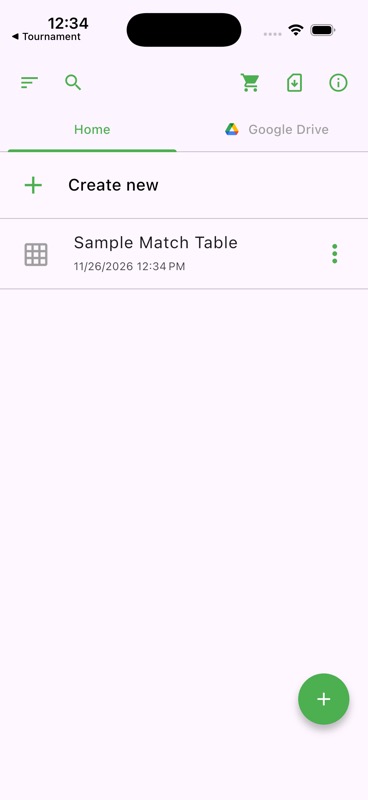
- Select the + Create new row in the file list.
- Enter a name for the match table and select OK.
Shintsha indlela yokuhlela amafayela ngokulandelana
- Sebenzisa isilawuli sokuhlela esingenhla kohlu lwamafayela. Esikrinini esincane, vula imenyu yokuhlela ngokulandelana.
- Khetha ukuhlela ngokosuku lokugcina lokulungiswa noma ngegama lefayela.
Search for a file by name
- Open Home or Google Drive, depending on where the file is stored, and select the Search icon.
- Enter part of the name in Search by file name. Select Close to see the full list again.
Yenza ikhophi yefayela
- Vula imenyu yamachashazi amathathu yefayela bese ukhetha okuthi Yenza ikhophi.
- Vula ikhophi engezwe ohlwini ukuze uyihlele ngenkathi ugcina ifayela loqobo.
Susa ifayela
- Vula imenyu yamachashazi amathathu yefayela bese ukhetha okuthi Susa.
- Hlola umlayezo wokuqinisekisa bese ukhetha okuthi OK.
Efayeleni elabelwe nawe, imenyu ingase ibe nenketho yokususa ukwabelana.
Qamba kabusha ifayela
- Vula imenyu yamachashazi amathathu yefayela bese ukhetha Qamba kabusha.
- Faka igama elisha bese uqinisekisa.
Udinga imvume yokuhlela ukuze uqambe kabusha ifayela le-Google Drive okwabelwane ngalo nawe.
Import a match table
- Select Import in the file list and select OK to open the file picker.
- Choose a Simple MatchTable file (.matchtable).
Londoloza ku-Google Drive
- Khetha i-Google Drive ohlwini lwamafayela bese ulandela imiyalelo ukuze uxhume i-akhawunti yakho ye-Google.
- Dala ifayela elisha ohlwini lwe-Google Drive. Uma le nketho itholakala, ungahambisa nefayela eligcinwe kudivayisi yakho liye ku-Google Drive usebenzisa imenyu yalo yamachashazi amathathu.
Ukuvula ifayela kwenye idivayisi, xhuma i-akhawunti ye-Google oyisebenzise ukulilondoloza.
Hambisa amafayela phakathi kwedivayisi yakho ne-Google Drive
- Ohlelweni lokusebenza olufakiwe, xhuma i-akhawunti yakho ye-Google bese uvula imenyu yamachashazi amathathu yefayela.
- Khetha Hambisa ku-Google Drive noma Hambisa Ekhaya, kuye ngokuthi ifayela lilondolozwe kuphi, bese uqinisekisa.
Ukuhlela amafayela
Enter teams or players
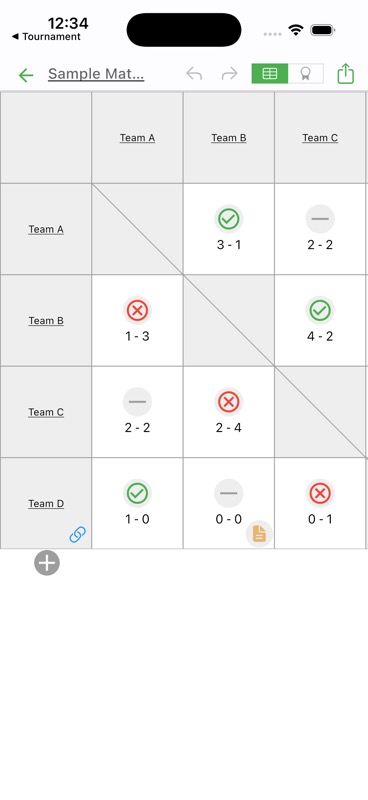
- Tap the team name at the top of a column or at the start of a row. Enter a name and select OK.
- To add more participants, use + at the right or bottom edge of the table.
Record scores and match results
- Tap the cell where the two opponents’ row and column intersect.
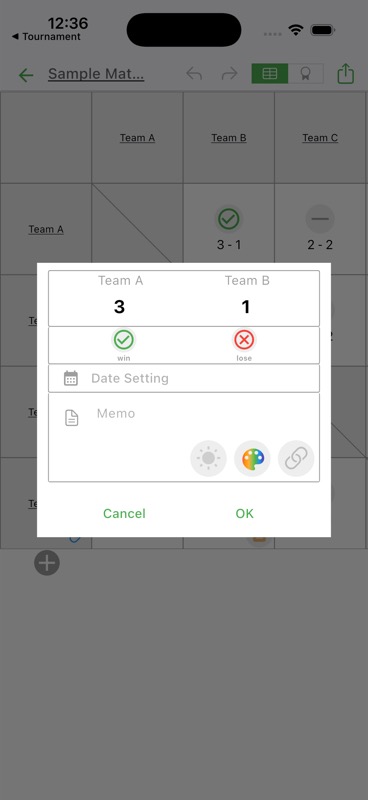
- Enter both scores. Use Win Loss Settings to choose a win, loss, or draw as needed, then select OK.
View team standings
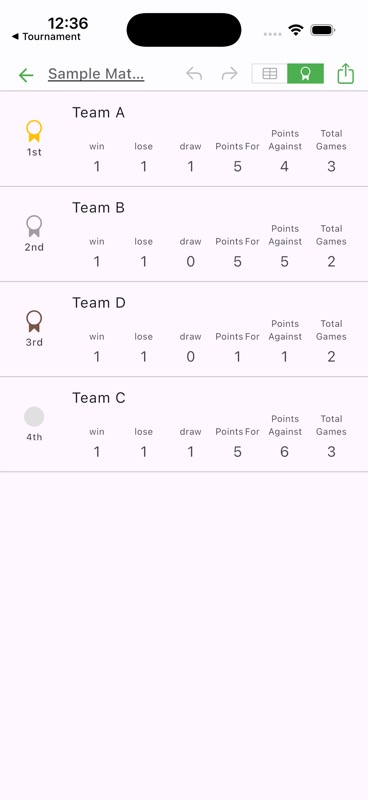
- Select the medal icon at the top of the editor.
- Review the standings and each team’s wins, losses, draws, points scored, points conceded, and total matches. Select the table icon to the left of the medal to return to the match table.
Record the date and a note for a match
- Open the match cell and select Date Setting to choose the date.
- Enter the venue or other details in the note field, then select OK.
Export a match table
- Select the share icon in the top-right corner of the editor.
- Choose CSV or Excel to analyze results in another app, or save the native .matchtable file to edit it again later.
Export formats marked with a lock require Pro.
Ukuthenga
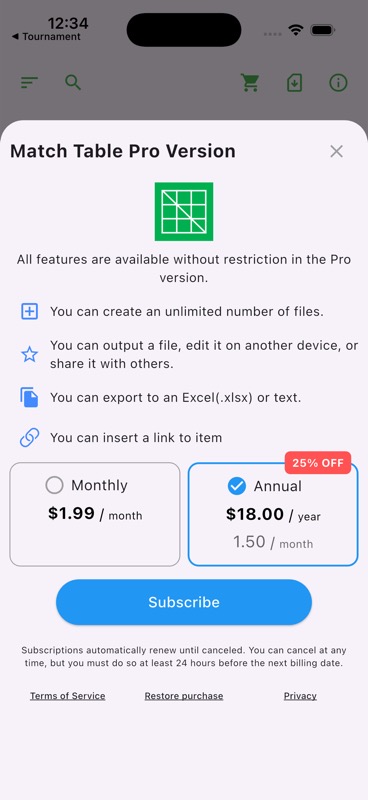
Thenga uhlelo olukhokhelwayo
- Khetha isithonjana senqola yokuthenga ohlwini lwamafayela.
- Hlola izinhlelo namanani azo esikrinini sokuthenga, bese ukhetha uhlelo ofuna ukuluthenga.
Buyisela okuthengile
- Uma uthenge uhlelo esitolo sezinhlelo zokusebenza, ngena nge-akhawunti yesitolo owayisebenzisa ukuthenga uhlelo.
- Vula isikrini sokuthenga kuhlelo lokusebenza, khetha okuthi “Buyisela okuthengile”, bese uhlola umphumela.
Phatha okuthengile noma ukubhalisa kwakho
- Uma imenyu yolwazi ohlwini lwamafayela inenketho yokuphatha okuthengile, yivule.
- Sebenzisa isitolo noma isevisi owathenga kuyo uhlelo ukuze uhlole noma ukhansele ukubhalisa kwakho.
I-akhawunti ekhokhelwayo
Xhumanisa okuthengile ne-akhawunti ye-Google
- Ngena ku-akhawunti yakho ye-Google kudivayisi lapho okuthengile kusasebenza khona.
- Uma inketho yokuxhumanisa okuthengile ne-akhawunti ye-Google ivela kumenyu, yikhethe bese uqinisekisa i-akhawunti.
- Ukuze usebenzise uhlelo lwakho olukhokhelwayo kwenye idivayisi esekelwayo, ngena nge-akhawunti ye-Google exhunywe kokuthengile.
Shintsha i-akhawunti ye-Google
- Hlola ukuthi iyiphi i-akhawunti ye-Google esetshenziswayo njengamanje kumenyu yolwazi yohlu lwamafayela.
- Uma inketho yokuphuma ku-akhawunti ikhona, yikhethe, bese uvula i-Google Drive ungene ku-akhawunti ofuna ukuyisebenzisa.
Kwenye idivayisi, sebenzisa i-akhawunti exhunywe kokuthengile noma kumafayela e-Drive ofuna ukuwafinyelela.