Daptar koropak
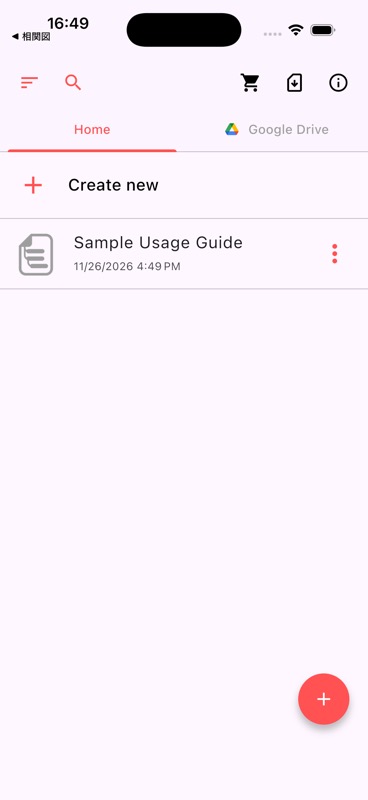
Create an outline file
- Select + Create new in the file list.
- Enter a name and select OK to open the outline editor.
Robah urutan koropak
- Paké kadali pangurutan di luhureun daptar koropak. Dina layar leutik, buka ménu pangurutan.
- Pilih urutan dumasar kana tanggal parobahan atawa ngaran koropak.
Search for a file by name
- Open Home or Google Drive, depending on where the file is stored, and select the Search icon.
- Enter part of the name in Search by file name. Select Close to see the full list again.
Jieun salinan koropak
- Buka ménu tilu titik dina koropak, tuluy pilih Duplikat.
- Buka salinan anu ditambahkeun kana daptar pikeun ngéditna bari tetep nyimpen koropak aslina.
Pupus koropak
- Buka ménu tilu titik dina koropak, tuluy pilih Pupus.
- Pariksa talatah konfirmasi, tuluy pilih OK.
Pikeun koropak anu dibagikeun ka anjeun, ménu bisa nyadiakeun pilihan pikeun ngeureunkeun babagi éta koropak.
Robah ngaran koropak
- Buka ménu tilu titik dina koropak, tuluy pilih Robah ngaran.
- Asupkeun ngaran anyar, tuluy konfirmasi.
Anjeun peryogi idin pikeun ngédit sangkan bisa ngarobah ngaran koropak Google Drive anu dibagikeun ka anjeun.
Import an outline file
- Select Import in the file list and select OK to open the file picker.
- Choose an outline file (.bmind). You can also import a JSON file containing data in the same format.
Simpen kana Google Drive
- Pilih Google Drive dina daptar koropak, tuluy turutan pituduh pikeun nyambungkeun akun Google anjeun.
- Jieun koropak anyar tina daptar Google Drive. Lamun pilihanna aya, anjeun ogé tiasa mindahkeun koropak lokal ka Google Drive ngaliwatan ménu tilu titikna.
Pikeun muka koropak dina alat séjén, sambungkeun akun Google anu dipaké pikeun nyimpen éta koropak.
Pindahkeun koropak antara alat anjeun jeung Google Drive
- Dina aplikasi anu geus dipasang, sambungkeun akun Google anjeun jeung buka ménu tilu titik dina koropak.
- Pilih Pindahkeun ka Google Drive atawa Pindahkeun ka Utama, gumantung kana tempat koropak disimpen, tuluy konfirmasi.
Ngédit koropak
Add topics at the same level or one level below
- Tap a topic to select it. Use the add buttons at the bottom to insert a topic at the same level or add a child topic below it.
- Type the new topic’s text. To change an existing topic, select it and tap it again.
When the root topic is selected, you can add a child topic.
Collapse and expand child topics
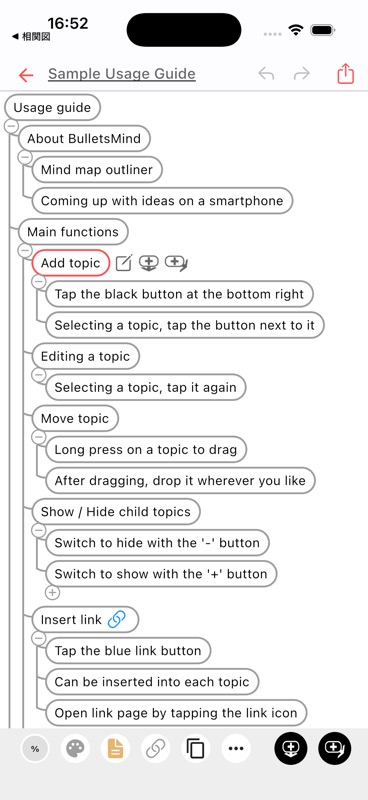
- Tap the minus sign next to a topic with children to collapse that branch.
- Tap the plus sign to expand it again. Collapse detailed branches when you want an overview of the headings.
Reorder topics or move them to another level
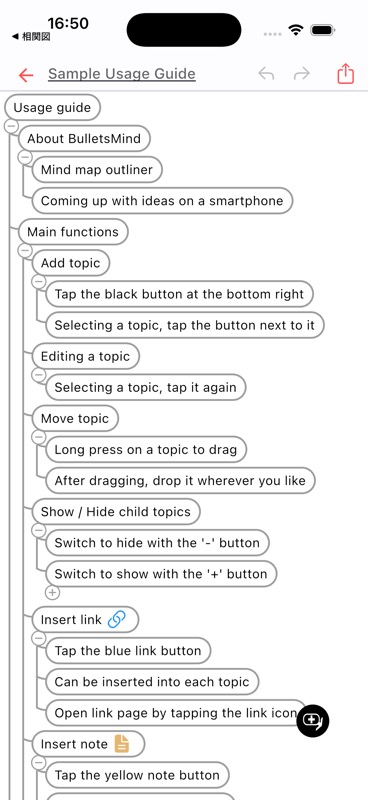
- Press and hold the topic you want to move, then drag it.
- Check the drop position before releasing. You can reorder topics or move a topic under a different parent.
Add a note to a topic
- Select the topic and choose Note in the bottom toolbar. On a narrow screen it may be in the three-dot menu.
- Enter the details. You can view the note later using the note icon next to that topic.
Export a BulletsMind outline
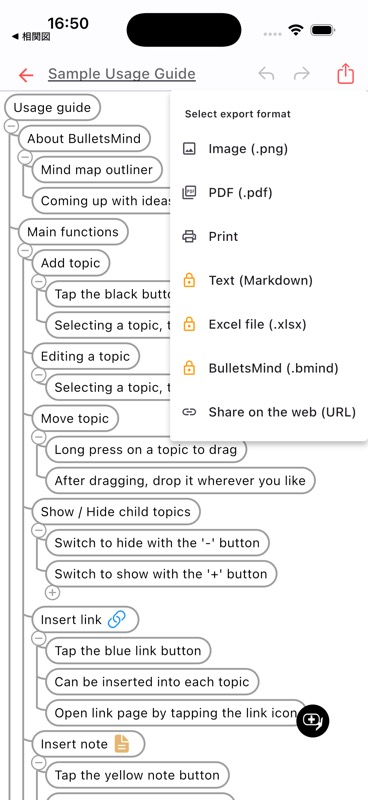
- Select the share icon in the top-right corner.
- Choose an image or PDF to preserve the appearance, Markdown to reuse the text, or Excel to open the data in a spreadsheet. Choose BulletsMind (.bmind) to reimport and edit the outline.
Export formats marked with a lock require Pro.
Pameseran
Mésér pakét mayar
- Pilih ikon karanjang balanja dina daptar file.
- Pariksa pakét sareng hargana dina layar pameseran, teras pilih pakét anu badé dipésér.
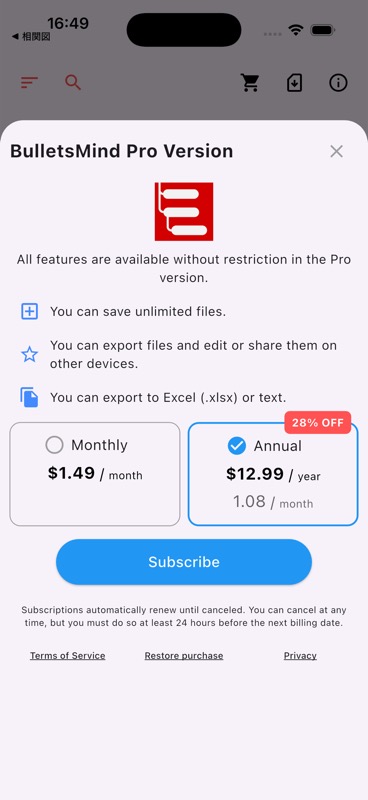
Mulihkeun pameseran
- Upami mésér pakét di toko aplikasi, lebet nganggo akun toko anu dianggo nalika mésér pakét.
- Buka layar pameseran dina aplikasi, pilih „Mulihkeun pameseran“, teras pariksa hasilna.
Ngatur pameseran atanapi langganan
- Upami aya pilihan pikeun ngatur pameseran dina ménu inpormasi daptar file, buka pilihan éta.
- Anggo toko atanapi layanan tempat anjeun mésér pakét pikeun mariksa atanapi ngabatalkeun langganan.
Akun mayar
Ngaitkeun pameseran kana akun Google
- Lebet kana akun Google dina alat anu gaduh pameseran anu masih aktip.
- Upami pilihan pikeun ngaitkeun pameseran kana akun Google muncul dina ménu, pilih éta sareng konfirmasi akunna.
- Pikeun nganggo pakét mayar dina alat sanés anu dirojong, lebet nganggo akun Google anu parantos dikaitkeun.
Ngaganti akun Google
- Pariksa akun Google anu aktip dina ménu inpormasi daptar file.
- Upami aya pilihan pikeun kaluar tina akun, pilih éta, teras buka Google Drive sareng lebet nganggo akun anu badé dianggo.
Dina alat sanés, anggo akun anu dikaitkeun sareng pameseran atanapi file Drive anu badé diaksés.