Dhaptar berkas
Create a sequence diagram file
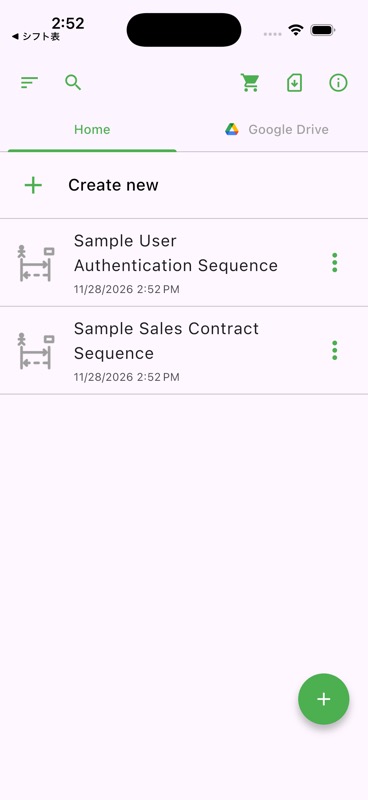
- Select + Create new in the file list.
- Enter a name and select OK to open the sequence diagram editor.
Ngganti urutan berkas
- Gunakake kontrol pangurutan ing sisih ndhuwur dhaptar berkas. Ing layar cilik, bukak menu pangurutan.
- Pilih ngurutake adhedhasar tanggal pangowahan utawa jeneng berkas.
Search for a file by name
- Open Home or Google Drive, depending on where the file is stored, and select the Search icon.
- Enter part of the name in Search by file name. Select Close to see the full list again.
Nggandakake berkas
- Bukak menu telung titik ing berkas banjur pilih Gandakake.
- Bukak salinan sing ditambahake ing dhaptar kanggo nyunting tanpa ngowahi berkas asli.
Mbusak berkas
- Bukak menu telung titik ing berkas banjur pilih Busak.
- Priksa pesen konfirmasi banjur pilih OK.
Kanggo berkas sing dituduhake marang sampeyan, menu bisa uga nyedhiyakake pilihan kanggo mbatalake enggo bareng.
Ngganti jeneng berkas
- Bukak menu telung titik ing file banjur pilih Ganti jeneng.
- Lebokna jeneng anyar banjur konfirmasi.
Kanggo ngganti jeneng file Google Drive sing dienggo bareng karo sampeyan, sampeyan kudu duwe idin kanggo nyunting.
Import a Mermaid diagram
- Select Import in the file list and select OK to open the file picker.
- Choose a Mermaid file (.mermaid or .mmd), then open it from the file list.
Nyimpen menyang Google Drive
- Pilih Google Drive ing dhaptar file banjur tindakna pituduh kanggo nyambungake Akun Google sampeyan.
- Gawe file anyar saka dhaptar Google Drive. Yen pilihan iki kasedhiya, sampeyan uga bisa mindhah file lokal menyang Google Drive liwat menu telung titik ing file kasebut.
Kanggo mbukak file ing piranti liyane, sambungna Akun Google sing digunakake kanggo nyimpen file kasebut.
Mindhah file antarane piranti lan Google Drive
- Ing aplikasi sing wis diinstal, sambungna Akun Google sampeyan banjur bukak menu telung titik ing file.
- Gumantung ing panggonan file disimpen, pilih Pindhah menyang Google Drive utawa Pindhah menyang Home, banjur konfirmasi.
Nyunting berkas
Describe participants and their messages to create a sequence diagram
- Open Sequence at the top, tap the input field at the bottom, and choose Edit.
- Describe the participants and messages in order. For example, “The customer sends an order to the store. The store checks stock with the warehouse, then confirms the order to the customer.” Select Send.
- Review who sends each message and check the direction and order of the arrows.
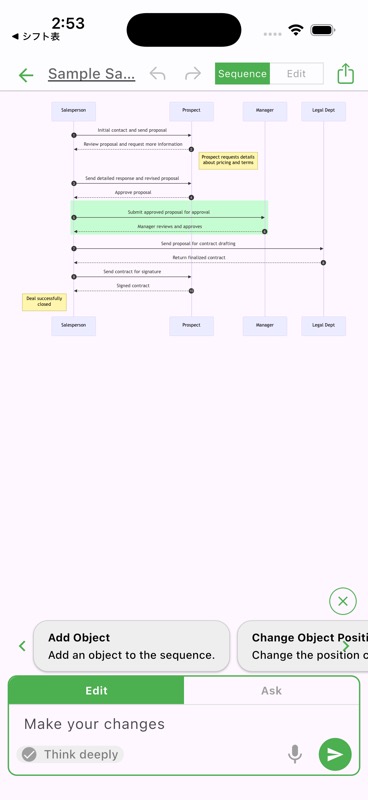
Ask AI about the sequence diagram
- On Sequence, tap the input field at the bottom and choose Ask.
- Send a question such as “Who does the store contact after checking stock?” and read the reply in the chat window.
Edit participants and messages in Mermaid
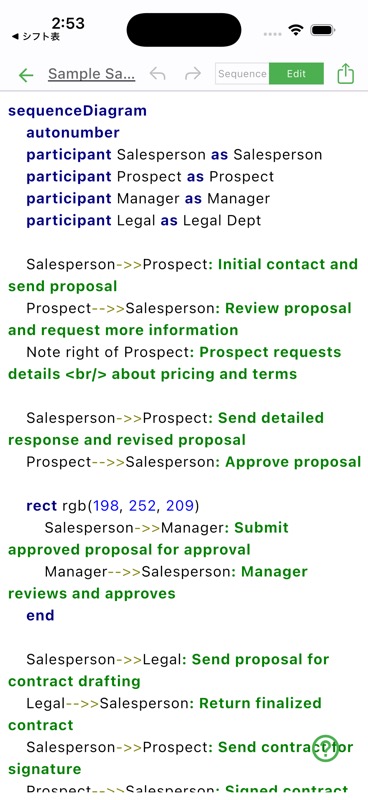
- Choose Edit at the top to open the Mermaid source.
- Update participant names, message text, or message order. Switch back to Sequence to check the diagram.
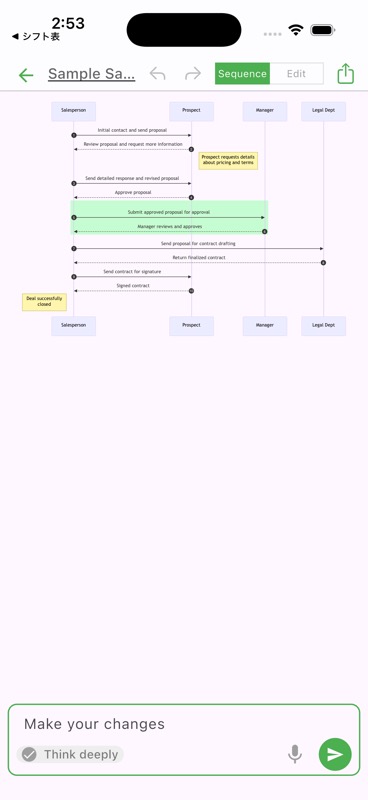
Export the diagram as an image, Mermaid, or HTML
- Select the share icon in the top-right corner of the editor.
- Choose an image to place the diagram in another document, Mermaid (.mermaid) to edit the source later, or HTML to open the file in a browser.
Tuku
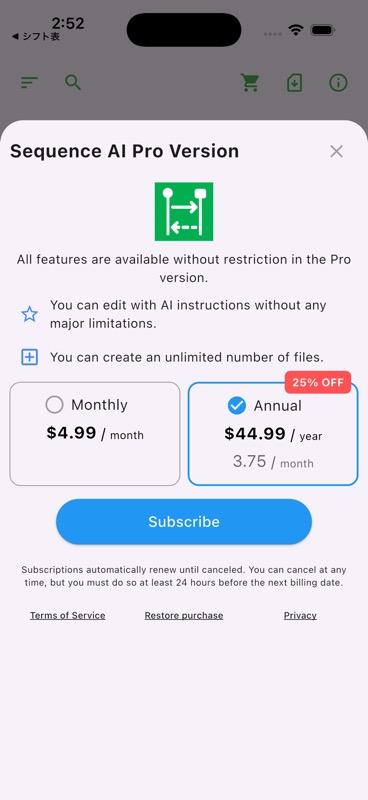
Tuku paket berbayar
- Pilih lambang kranjang blanja ing dhaptar file.
- Priksa paket lan rega ing layar tuku, banjur pilih paket sing arep sampeyan tuku.
Mulihake tuku
- Yen tuku liwat toko aplikasi, mlebu nganggo akun toko sing digunakake kanggo tuku paket kasebut.
- Bukak layar tuku ing aplikasi, pilih «Mulihake tuku», banjur priksa asile.
Ngatur tuku utawa langganan
- Yen menu informasi ing dhaptar file nyedhiyakake pilihan kanggo ngatur tuku, bukak pilihan kasebut.
- Gunakake toko utawa layanan sing sampeyan gunakake kanggo tuku paket kanggo mriksa utawa mbatalake langganan.
Akun berbayar
Nyambungake tuku menyang akun Google
- Mlebu menyang akun Google ing piranti sing duwe tuku aktif.
- Yen pilihan kanggo nyambungake tuku menyang akun Google katon ing menu, pilih pilihan kasebut lan konfirmasi akun kasebut.
- Kanggo nggunakake paket berbayar ing piranti liyane sing didhukung, mlebu nganggo akun Google sing wis disambungake.
Ngalih akun Google
- Priksa akun Google sing lagi aktif ing menu informasi dhaptar file.
- Yen ana pilihan kanggo metu saka akun, pilih pilihan kasebut, banjur bukak Google Drive lan mlebu nganggo akun sing arep sampeyan gunakake.
Ing piranti liyane, gunakake akun sing disambungake karo tuku utawa file Drive sing arep sampeyan akses.