Lisitry ny rakitra
Create a match table
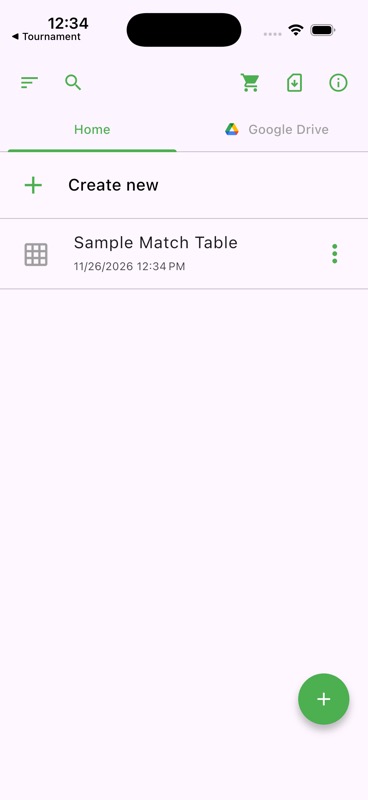
- Select the + Create new row in the file list.
- Enter a name for the match table and select OK.
Hanova ny filaharan'ny rakitra
- Ampiasao ny safidy fandaharana eo an-tampon'ny lisitry ny rakitra. Raha kely ny efijery, sokafy ny menio fandaharana.
- Safidio ny fandaharana araka ny daty nanovana na ny anaran'ny rakitra.
Search for a file by name
- Open Home or Google Drive, depending on where the file is stored, and select the Search icon.
- Enter part of the name in Search by file name. Select Close to see the full list again.
Hanao dika mitovy amin'ny rakitra
- Sokafy ny menio misy teboka telo an'ilay rakitra ary safidio ny « Hanao dika mitovy ».
- Sokafy ilay dika mitovy nampidirina tao amin'ny lisitra mba hanovana azy nefa hitazonana ny rakitra voalohany.
Hamafa rakitra
- Sokafy ny menio misy teboka telo an'ilay rakitra ary safidio ny « Hamafa ».
- Jereo ny hafatra fangatahana fanamafisana ary safidio ny « OK ».
Raha rakitra nozaraina taminao ilay izy, dia mety hisy safidy hanafoanana ny fizarana ao amin'ny menio.
Hanova ny anaran'ny rakitra
- Sokafy ny menio misy teboka telo an'ilay rakitra ary fidio ny hoe Hanova anarana.
- Ampidiro ny anarana vaovao ary hamafiso.
Mila fahazoan-dalana hanova rakitra ianao raha te hanova ny anaran'ny rakitra Google Drive nozaraina taminao.
Import a match table
- Select Import in the file list and select OK to open the file picker.
- Choose a Simple MatchTable file (.matchtable).
Hitahiry ao amin'ny Google Drive
- Fidio ny Google Drive ao amin'ny lisitry ny rakitra ary araho ny toromarika mba hampifandraisana ny kaontinao Google.
- Mamoròna rakitra vaovao ao amin'ny lisitry ny Google Drive. Raha misy io safidy io, azonao afindra ao amin'ny Google Drive koa ny rakitra voatahiry ao amin'ny fitaovanao amin'ny alalan'ny menio misy teboka telo an'ilay rakitra.
Mba hanokafana ilay rakitra amin'ny fitaovana hafa, ampifandraiso ny kaonty Google nampiasainao nitahirizana azy.
Hamindra rakitra eo amin'ny fitaovanao sy Google Drive
- Ao amin'ny fampiharana napetraka amin'ny fitaovanao, ampifandraiso ny kaontinao Google ary sokafy ny menio misy teboka telo an'ilay rakitra.
- Arakaraka ny toerana itahirizana ilay rakitra, fidio ny hoe Hamindra any amin'ny Google Drive na Hamindra any amin'ny Home, ary hamafiso.
Fanovana rakitra
Enter teams or players
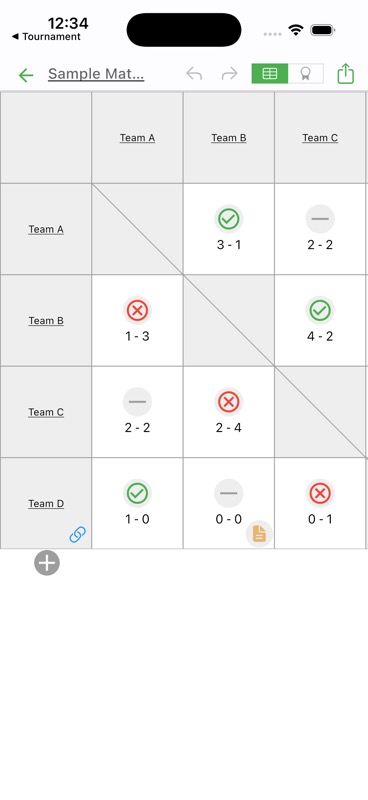
- Tap the team name at the top of a column or at the start of a row. Enter a name and select OK.
- To add more participants, use + at the right or bottom edge of the table.
Record scores and match results
- Tap the cell where the two opponents’ row and column intersect.
- Enter both scores. Use Win Loss Settings to choose a win, loss, or draw as needed, then select OK.
View team standings
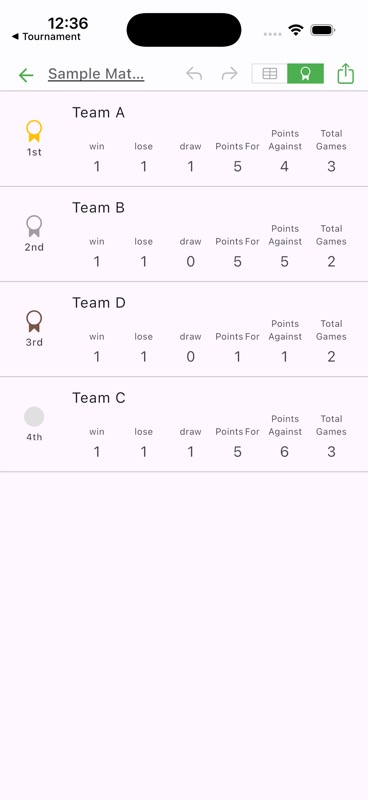
- Select the medal icon at the top of the editor.
- Review the standings and each team’s wins, losses, draws, points scored, points conceded, and total matches. Select the table icon to the left of the medal to return to the match table.
Record the date and a note for a match
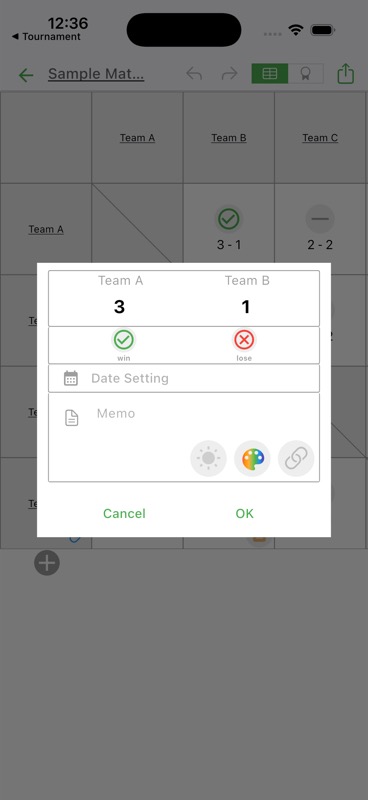
- Open the match cell and select Date Setting to choose the date.
- Enter the venue or other details in the note field, then select OK.
Export a match table
- Select the share icon in the top-right corner of the editor.
- Choose CSV or Excel to analyze results in another app, or save the native .matchtable file to edit it again later.
Export formats marked with a lock require Pro.
Fividianana
Hividy drafitra misy sarany
- Safidio ny kisary sarety fiantsenana ao amin'ny lisitry ny rakitra.
- Jereo ireo drafitra sy ny vidiny eo amin'ny efijery fividianana, dia safidio ny drafitra tianao hovidina.
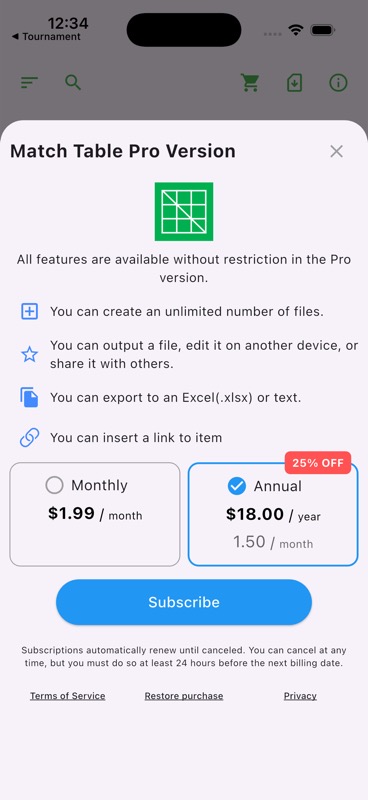
Hamerina amin'ny laoniny ny fividianana
- Raha nividy tao amin'ny fivarotana rindranasa ianao, midira amin'ilay kaontin'ny fivarotana nampiasainao hividianana ilay drafitra.
- Sokafy ao amin'ny rindranasa ny efijery fividianana, safidio ny «Avereno amin'ny laoniny ny fividianana», ary jereo ny vokatra.
Hitantana ny fividianana na ny famandrihana
- Raha misy safidy fitantanana ny fividianana ao amin'ny menio fampahalalana amin'ny lisitry ny rakitra, sokafy izany.
- Ampiasao ilay fivarotana na tolotra nividiananao ny drafitra raha hijery na hanafoana ny famandrihanao.
Kaonty andoavam-bola
Hampifandray ny fividianana amin'ny kaonty Google
- Midira amin'ny kaontinao Google amin'ilay fitaovana misy fividianana mbola manan-kery.
- Raha miseho ao amin'ny menio ny safidy hampifandray ny fividianana amin'ny kaonty Google, safidio izany ary hamafiso ilay kaonty.
- Raha hampiasa ny drafitrao misy sarany amin'ny fitaovana hafa tohanana ianao, midira amin'ilay kaonty Google nampifandraisina.
Hifindra amin'ny kaonty Google hafa
- Jereo ao amin'ny menio fampahalalana amin'ny lisitry ny rakitra hoe iza amin'ireo kaonty Google no ampiasaina amin'izao fotoana izao.
- Raha misy safidy hivoahana amin'ny kaonty, safidio izany, dia sokafy ny Google Drive ary midira amin'ny kaonty tianao hampiasaina.
Amin'ny fitaovana hafa, ampiasao ny kaonty mifandray amin'ny fividianana na amin'ireo rakitra Drive tianao hidirana.