Mndandanda wa mafayilo
Create a match table
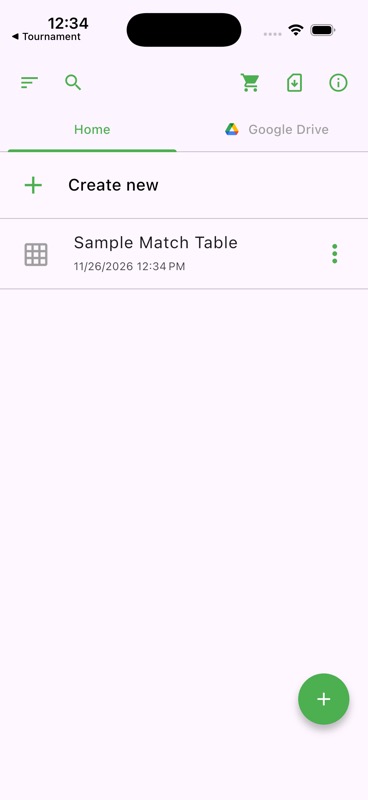
- Select the + Create new row in the file list.
- Enter a name for the match table and select OK.
Kusintha dongosolo la mafayilo
- Gwiritsani ntchito njira yosanja yomwe ili pamwamba pa mndandanda wa mafayilo. Pa sikirini yaying'ono, tsegulani menyu yosanja.
- Sankhani kusanja potengera tsiku limene fayilo inasinthidwa kapena dzina la fayilo.
Search for a file by name
- Open Home or Google Drive, depending on where the file is stored, and select the Search icon.
- Enter part of the name in Search by file name. Select Close to see the full list again.
Kupanga kope la fayilo
- Tsegulani menyu ya madontho atatu ya fayiloyo ndikusankha Pangani kope.
- Tsegulani kope lomwe lawonjezedwa pa mndandanda kuti mulisinthe pamene mukusunga fayilo yoyambirira.
Kuchotsa fayilo
- Tsegulani menyu ya madontho atatu ya fayiloyo ndikusankha Chotsani.
- Yang'anani uthenga wotsimikizira ndikusankha OK.
Pa fayilo yomwe munthu wina wagawana nanu, menyu ikhoza kukhala ndi njira yochotsera kugawana.
Kusintha dzina la fayilo
- Tsegulani menyu ya madontho atatu ya fayiloyo ndikusankha Sinthani dzina.
- Lowetsani dzina latsopano ndikutsimikizira.
Muyenera kukhala ndi chilolezo chosinthira fayilo ya Google Drive yomwe mwagawana nayo kuti musinthe dzina lake.
Import a match table
- Select Import in the file list and select OK to open the file picker.
- Choose a Simple MatchTable file (.matchtable).
Sungani ku Google Drive
- Sankhani Google Drive pa mndandanda wa mafayilo ndipo tsatirani malangizo kuti mulumikize akaunti yanu ya Google.
- Pangani fayilo yatsopano kuchokera pa mndandanda wa Google Drive. Ngati njirayi ilipo, mungasamutsenso fayilo yosungidwa pa chipangizo chanu kupita ku Google Drive pogwiritsa ntchito menyu yake ya madontho atatu.
Kuti mutsegule fayiloyo pa chipangizo china, lumikizani akaunti ya Google yomwe munagwiritsa ntchito poisunga.
Samutsani mafayilo pakati pa chipangizo chanu ndi Google Drive
- Mu pulogalamu yomwe mwaika pa chipangizo chanu, lumikizani akaunti yanu ya Google ndipo tsegulani menyu ya madontho atatu ya fayiloyo.
- Sankhani Samutsani ku Google Drive kapena Samutsani ku Home, malinga ndi kumene fayiloyo yasungidwa, ndipo tsimikizirani.
Kusintha mafayilo
Enter teams or players
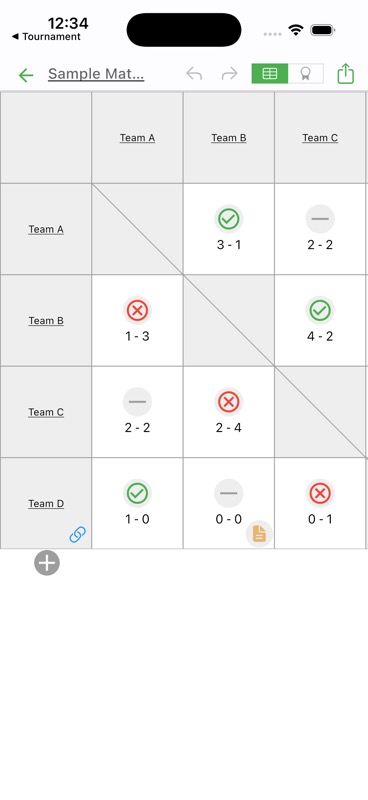
- Tap the team name at the top of a column or at the start of a row. Enter a name and select OK.
- To add more participants, use + at the right or bottom edge of the table.
Record scores and match results
- Tap the cell where the two opponents’ row and column intersect.
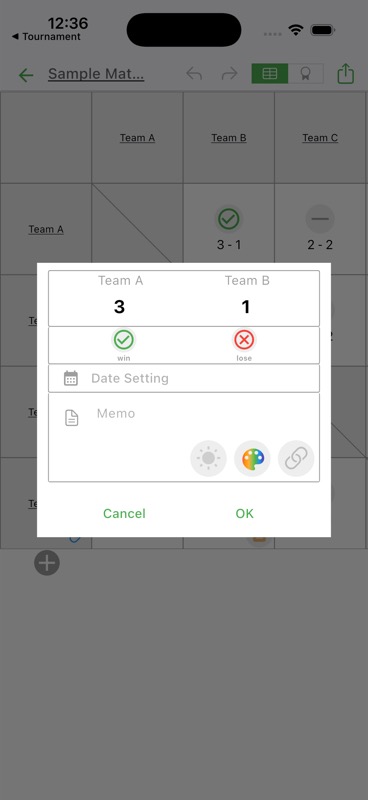
- Enter both scores. Use Win Loss Settings to choose a win, loss, or draw as needed, then select OK.
View team standings
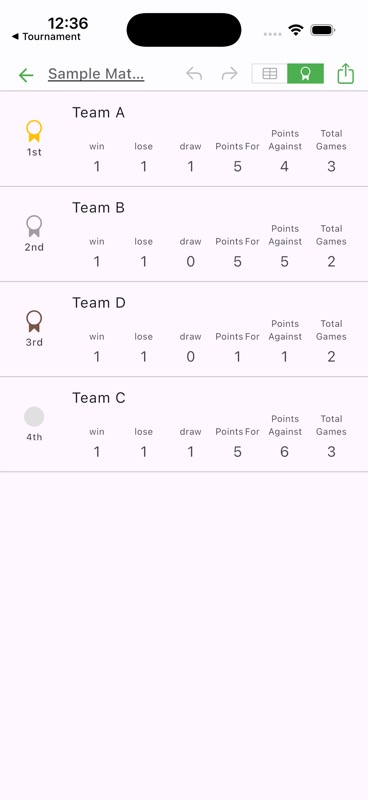
- Select the medal icon at the top of the editor.
- Review the standings and each team’s wins, losses, draws, points scored, points conceded, and total matches. Select the table icon to the left of the medal to return to the match table.
Record the date and a note for a match
- Open the match cell and select Date Setting to choose the date.
- Enter the venue or other details in the note field, then select OK.
Export a match table
- Select the share icon in the top-right corner of the editor.
- Choose CSV or Excel to analyze results in another app, or save the native .matchtable file to edit it again later.
Export formats marked with a lock require Pro.
Zogula
Gulani pulani yolipira
- Sankhani chizindikiro cha dengu logulira pa mndandanda wa mafayilo.
- Onani mapulani ndi mitengo yake pa sikirini yogulira, kenako sankhani pulani yomwe mukufuna kugula.
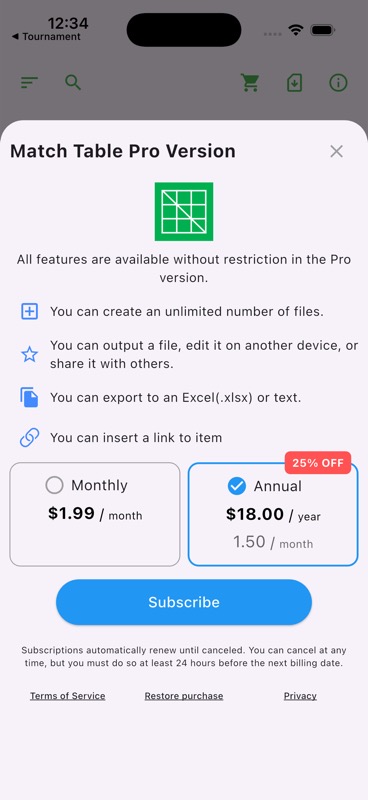
Bwezeretsani zomwe munagula
- Ngati munagula kudzera m'sitolo ya mapulogalamu, lowani ndi akaunti ya sitolo yomwe munagwiritsa ntchito pogula pulaniyo.
- Tsegulani sikirini yogulira mu pulogalamuyi, sankhani «Bwezeretsani zomwe munagula», ndipo onani zotsatira zake.
Samalirani zomwe munagula kapena zolembetsa zanu
- Ngati menyu ya zambiri pa mndandanda wa mafayilo ili ndi njira yosamalira zogula, tsegulani njirayo.
- Gwiritsani ntchito sitolo kapena sevisi imene munagulako pulaniyo kuti muone kapena kuletsa zolembetsa zanu.
Akaunti yolipira
Lumikizani zomwe munagula ndi akaunti ya Google
- Lowani mu akaunti yanu ya Google pa chipangizo chomwe muli ndi zomwe munagula zomwe zikugwirabe ntchito.
- Ngati njira yolumikiza zomwe munagula ndi akaunti ya Google ikuoneka mu menyu, sankhani njirayo ndipo tsimikizirani akauntiyo.
- Kuti mugwiritse ntchito pulani yanu yolipira pa chipangizo china chomwe chimathandizidwa, lowani ndi akaunti ya Google yolumikizidwayo.
Sinthani akaunti ya Google
- Onani akaunti ya Google yomwe ikugwiritsidwa ntchito mu menyu ya zambiri pa mndandanda wa mafayilo.
- Ngati njira yotulukira mu akaunti ilipo, sankhani njirayo, kenako tsegulani Google Drive ndipo lowani mu akaunti yomwe mukufuna kugwiritsa ntchito.
Pa chipangizo china, gwiritsani ntchito akaunti yolumikizidwa ndi zomwe munagula kapena mafayilo a Drive omwe mukufuna kupeza.