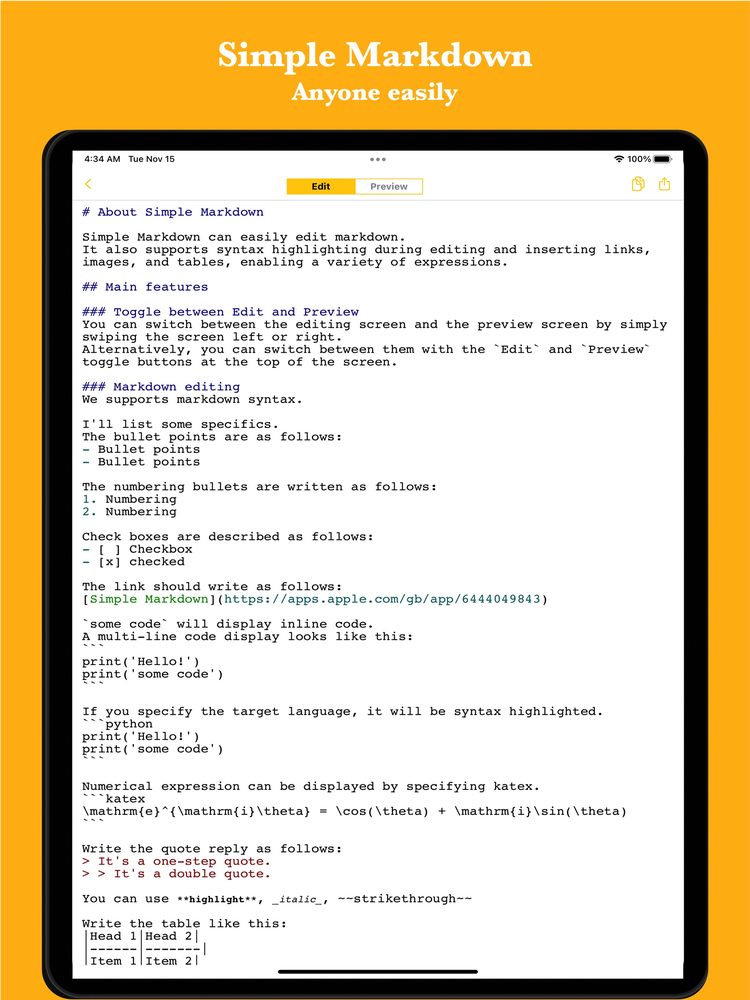
What is Markdown?
Markdown is a lightweight markup language created in 2004 by John Gruber and Aaron Swartz. It allows you to format documents using simple keyboard symbols like hashes (#) and hyphens (-), without lifting your hands from the keys.
Unlike heavy word processors with complex toolbars, Markdown keeps the source text natural and readable. You can focus entirely on the flow of your thoughts, while modern apps render it into clean, structured documents in real time.
Easy to read and write
Designed to look natural and readable as plain text, even before conversion into formatted HTML.
Durable and future-proof
Stored as universal plain text, your notes will never be locked into a proprietary or discontinued format.
Lightweight and distraction-free
No complex dialogs or formatting delays—just fast, uninterrupted writing from any device.
Core syntax at a glance
You only need a handful of basic rules to write almost any document. These simple conventions make it effortless to structure your notes on the fly.
Headings (#)
Use one to six hash symbols at the start of a line to establish document hierarchy (# H1, ## H2, ### H3).
Lists (- and 1.)
Create bullet points with hyphens or asterisks, and numbered lists with numbers followed by a period.
Emphasis (**bold** and *italic*)
Wrap text with double asterisks for bold or single asterisks for italics to highlight key terms.
Links and images
Add clickable links with [Label](URL) and embed images with  seamlessly.
Quotes and code blocks
Prepend lines with > for blockquotes, and surround code or formulas with backticks.
Tables and checklists
Format tabular data with pipes (|) and manage interactive task lists with - [x] and - [ ].
Where does Markdown shine?
Originally favored by developers and writers, Markdown has become a universal standard for documentation across many everyday and professional fields.
Daily notes and brainstorming
Capture fleeting thoughts, daily logs, and to-do lists without getting distracted by formatting styles.
Meeting minutes and agendas
Keep up with live discussions in real time, organizing action items and decisions on the fly.
Documentation and knowledge bases
Write software README files, team wikis, and business manuals that remain readable anywhere.
Blogging and publication
Draft content that publishes cleanly to modern content management systems, tech blogs, and static sites.
Choosing the right tool for your workflow
Because Markdown is an open standard, there is a rich ecosystem of apps tailored for different workflows. Choosing the right tool depends on your priorities.
Personal knowledge graphs
Apps like Obsidian and Logseq connect vast collections of notes through bidirectional links while keeping files locally on your disk.
Team collaboration workspaces
Platforms like Notion and Scrapbox blend Markdown editing with live databases, shared project spaces, and team wikis.
Code editors and publishing
Tools like VS Code and Typora offer powerful extensions, Git version control, and live side-by-side previews for technical authors.
Lightweight note capture
Quick, distraction-free editors focused on launching instantly, jotting notes on mobile, and checking preview without complex setups.
A simple way to start on mobile and web
While feature-rich knowledge tools are powerful, they can sometimes feel heavy or require learning complex settings just to take a quick note on the go.
If you want a lightweight, straightforward way to write Markdown on your phone or in a browser, we also offer our own free tool, Simple Markdown Editor. It requires no user registration and lets you switch between writing and preview with a smooth swipe. Alongside mobile apps, a web version is available directly in your browser at markdown.tanaike.jp, making it an easy way to try out Markdown whenever inspiration strikes.
Instant startup without sign-up
Open the app and start writing immediately—no account creation, passwords, or cloud sync configuration required.
Swipe to preview
Quickly verify your formatted text with a natural swipe gesture between the editor and preview screens.
Available on mobile and web
Use the native mobile app on iOS/Android or access the web version at markdown.tanaike.jp from any computer browser without installation.
Try Markdown simply
Experience Markdown note-taking and preview instantly on mobile and the web, with no account registration required.