Rondedzero yemafaira
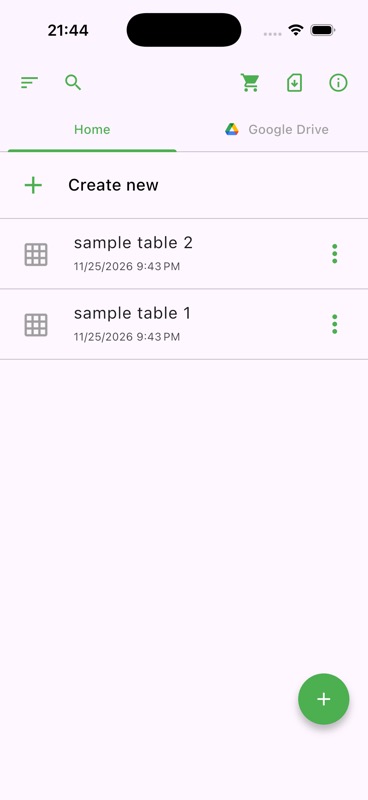
Create a check sheet
- Tap the + Create new row in the file list.
- Enter a name and select OK to open the editor.
Chinja marongerwo emafaira
- Shandisa sarudzo yekuronga iri pamusoro perondedzero yemafaira. Pachidzitiro chidiki, vhura menyu yekuronga.
- Sarudza kuronga maererano nezuva rekugadziriswa kana zita refaira.
Search for a file by name
- Open Home or Google Drive, depending on where the file is stored, and select the Search icon.
- Enter part of the name in Search by file name. Select Close to see the full list again.
Gadzira kopi yefaira
- Vhura menyu yemadotsi matatu yefaira uye sarudza Gadzira kopi.
- Vhura kopi yawedzerwa murondedzero kuti uigadzirise uchichengeta faira rekutanga.
Dzima faira
- Vhura menyu yemadotsi matatu yefaira uye sarudza Dzima.
- Tarisa meseji yekusimbisa uye sarudza OK.
Pafaira rawakagoverwa, menyu inogona kuva nesarudzo yekubvisa kugoverwa kwaro.
Chinja zita refaira
- Vhura menyu yemadotsi matatu yefaira wosarudza Chinja zita.
- Isa zita idzva wobva wasimbisa.
Unoda mvumo yekugadzirisa kuti uchinje zita refaira reGoogle Drive rakagoverwa kwauri.
Import a check sheet
- Select Import in the file list, then select OK to open the file picker.
- Choose a CheckTable file (.scsheet) or a comma-separated CSV file.
Chengeta muGoogle Drive
- Sarudza Google Drive murondedzero yemafaira wotevera mirayiridzo yekubatanidza akaundi yako yeGoogle.
- Gadzira faira idzva kubva murondedzero yeGoogle Drive. Kana sarudzo yacho iripo, unogonawo kutamisa faira riri pamudziyo kuGoogle Drive uchishandisa menyu yaro yemadotsi matatu.
Kuti uvhure faira pane mumwe mudziyo, batanidza akaundi yeGoogle yawakashandisa kurichengeta.
Tamisa mafaira pakati pemudziyo wako neGoogle Drive
- Muapu yakaiswa pamudziyo, batanidza akaundi yako yeGoogle wovhura menyu yemadotsi matatu yefaira.
- Sarudza Tamisa kuGoogle Drive kana Tamisa kuHOME, zvichienderana nekwakachengetwa faira, wobva wasimbisa.
Kugadzirisa mafaira
Tick or clear a cell
- Tap a cell to cycle through the marks configured for the sheet.
- Where right-click is available, open Change mark from the cell menu to pick a mark directly. Select Clear there to remove the mark.
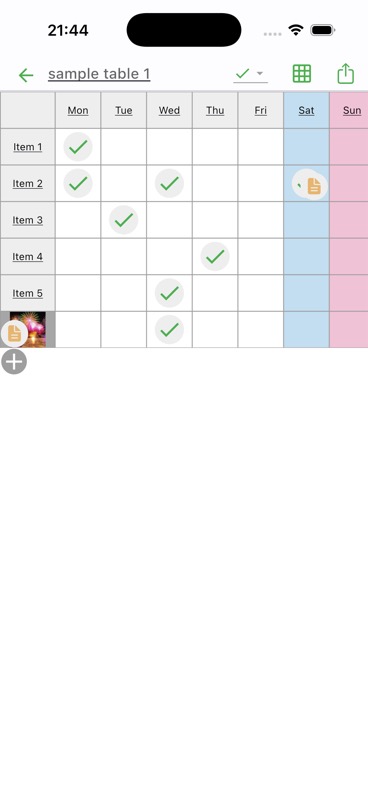
Choose the marks used in the sheet
- Tap the marks and downward arrow at the top of the editor.
- Choose the set you want to use. Tap a cell to cycle through the selected marks.
Edit row and column labels
- Tap a row or column label.
- Change the label and select OK. Use + at the edge of the sheet to add a row or column.
Add a note, color, or link to a cell
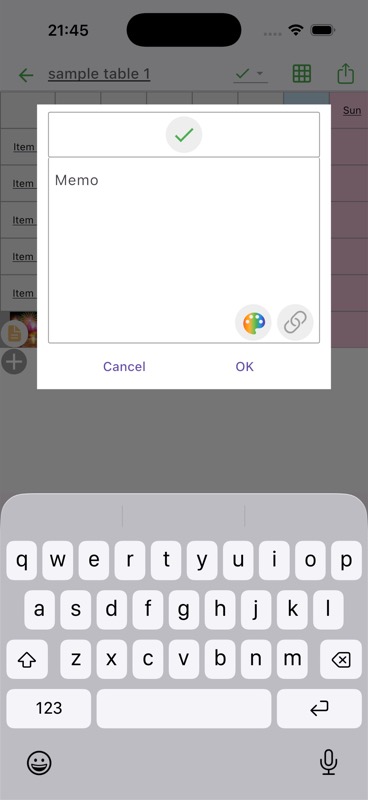
- Press and hold a cell to open the cell editor.
- Enter a note or select the color or link icon. Select OK to apply your changes.
Clear every check mark
- Open the table menu by selecting the grid icon at the top right of the editor.
- Select Clear all checks and then select OK in the confirmation.
This resets the marks while keeping the rows, columns, and cell content.
Export a check sheet
- Select the share icon in the top-right corner of the editor.
- Choose Image (.png) or PDF to preserve the appearance, or CSV or Excel for use in another app. To reimport the file later, select CheckTable (.scsheet).
Export formats marked with a lock require Pro.
Kutenga
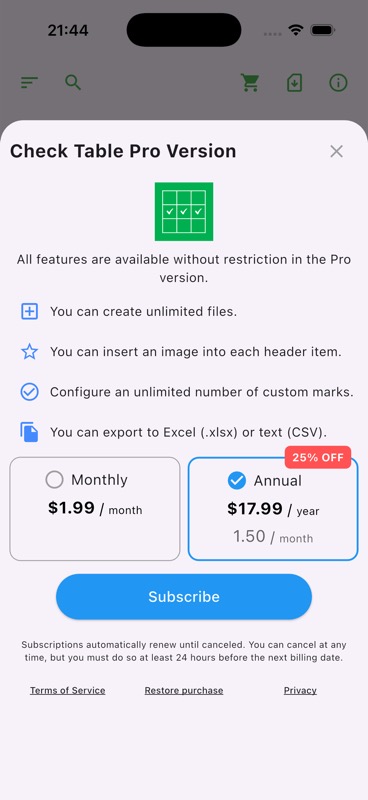
Tenga chirongwa chinobhadharwa
- Sarudza chiratidzo chengoro yekutengera murondedzero yemafaira.
- Ongorora zvirongwa nemitengo pachidzitiro chekutenga, wobva wasarudza chirongwa chaunoda kutenga.
Dzosera zvawakatenga
- Kana wakatenga muchitoro chemaapuro, pinda uchishandisa akaundi yechitoro yawakashandisa kutenga chirongwa.
- Vhura chidzitiro chekutenga muapuro, sarudza “Dzosera zvawakatenga”, wotarisa zvabuda.
Tonga zvawakatenga kana kunyoreswa kwako
- Kana menyu yeruzivo murondedzero yemafaira iine sarudzo yekutonga zvawakatenga, ivhure.
- Shandisa chitoro kana sevhisi yawakatengera chirongwa kuti uongorore kana kukanzura kunyoreswa kwako.
Akaundi inobhadharirwa
Batanidza zvawakatenga neakaundi yeGoogle
- Pinda muakaundi yako yeGoogle pamudziyo une zvawakatenga zvichiri kushanda.
- Kana sarudzo yekubatanidza zvawakatenga neakaundi yeGoogle ikaonekwa mumenu, isarudze uye simbisa akaundi yacho.
- Kuti ushandise chirongwa chako chinobhadharwa pane mumwe mudziyo unotsigirwa, pinda neakaundi yeGoogle yakabatanidzwa.
Chinja maakaundi eGoogle
- Tarisa kuti iakaundi ipi yeGoogle iri kushandiswa mumenu yeruzivo murondedzero yemafaira.
- Kana sarudzo yekubuda muakaundi iripo, isarudze, wobva wavhura Google Drive uye wopinda muakaundi yaunoda kushandisa.
Pane mumwe mudziyo, shandisa akaundi yakabatana nezvawakatenga kana nemafaira eDrive aunoda kuwana.