


HTML Slide AI was released on iOS.
Features

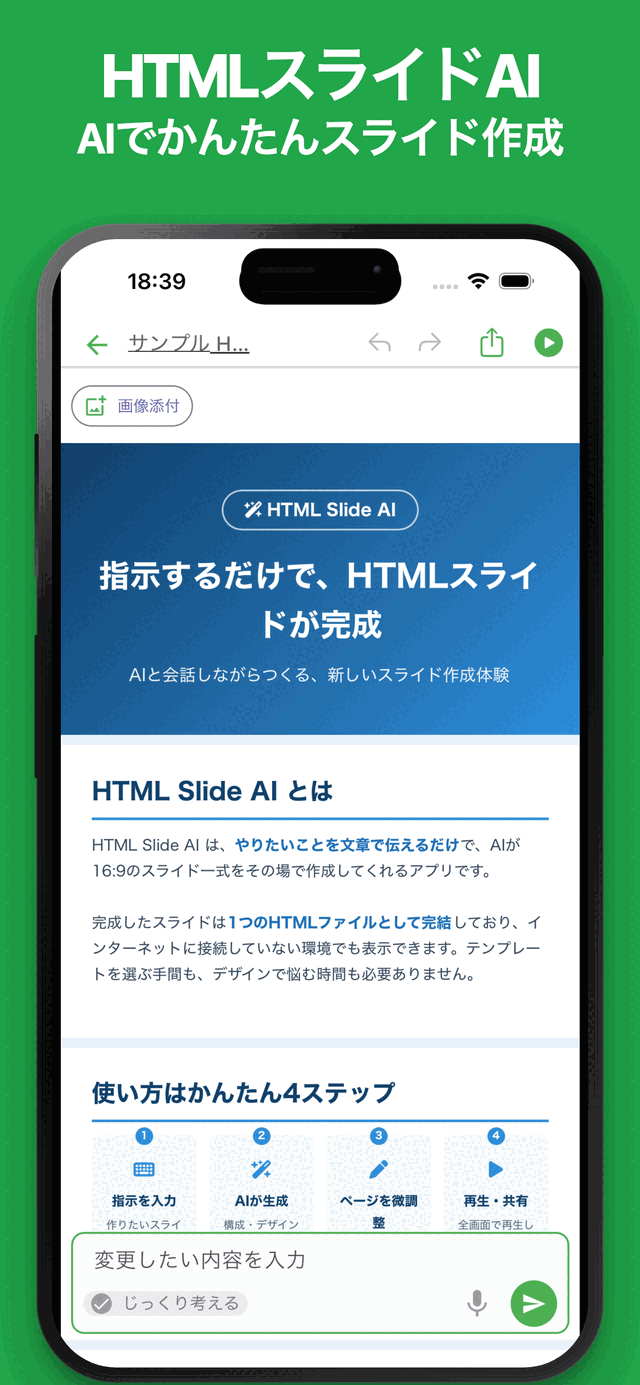
AI generates slides
Just share the key points and AI builds the structure, text and design

Preview and present
Check your slides instantly and present them right from the app

Expressive HTML design
Tables, charts and flexible layouts that go beyond plain text

PDF, images and print
Export in the format you need and share it anywhere
About this app
Create Slides with AI—Just Describe What You Need
HTML Slide AI lets you create HTML-based presentations simply by describing what you want in your own words.
Create proposals, business presentations, service introductions, educational materials, and many other types of slides directly from your smartphone or tablet.
Because the slides are built with HTML, you can create expressive presentations with flexible layouts, colors, charts, tables, and other visual elements.
Once generated, your slides can be edited, previewed, and presented directly in the app.
Features
Just Describe What You Want
Simply tell the AI what kind of presentation you want to create.
The AI organizes your ideas and automatically generates the slide structure, titles, content, and design.
Example: “Create a presentation introducing a new service.” The AI creates slides covering the service overview, key features, use cases, and more.
Example: “Create an eight-slide proposal for improving internal operations.” The AI organizes the presentation into sections such as current challenges, proposed improvements, expected results, and next steps.
Edit Easily with AI
Give the AI additional instructions to revise your presentation.
You can update not only the wording, but also the structure, colors, layout, and overall design.
Example: “Change the entire presentation to a calm blue color scheme.”
Example: “Shorten the text and make the key points easier to understand.”
Edit Individual Slides
Select a slide and use AI to edit only that slide.
This is useful when you want to make detailed changes without affecting the structure of the rest of the presentation.
Example: “Add a pricing table to this slide.”
Example: “Rewrite this slide for a beginner audience.”
AI-Powered Improvement Suggestions
The AI can review your entire presentation and suggest improvements from multiple perspectives, including structure, readability, text density, and audience suitability.
- Improve the overall presentation flow
- Adjust text length and density
- Improve the title slide
- Make terminology and wording consistent
- Identify content that could be visualized
- Add a conclusion or next steps
- Check for typos and unnatural wording
Flexible HTML-Based Design
Because every slide is created with HTML, you can use more than just text and images.
Create tables, charts, card-based layouts, and other visually rich designs suited to your content.
The AI can also suggest presentation styles that go beyond conventional slide layouts.
Instant Preview
Preview your presentation immediately after creating or editing it.
Review the content and design as you work, making it easy to refine your slides efficiently.
Present Directly from the App
Display your completed slides and present them directly within the app.
Creation, editing, previewing, and presenting can all be completed in one place.
Export to PDF, Images, and Print
Export your presentation in the format that best suits your needs.
- Save as a PDF
- Save individual slides as images
- Print your presentation
- Save in the app’s native format for later editing
This makes it easy to share, distribute, print, and continue editing your presentations.
Use Cases
- Business proposals and planning documents
- Product and service introductions
- Sales presentations
- Internal reports and process improvement proposals
- Class and lecture materials
- Seminar and event presentations
- Project status reports
- Research summaries and idea organization
- Self-introductions and portfolios
- Prototyping HTML-based presentation designs
With the power of AI, presentation creation begins with a simple description.
No advanced design or HTML knowledge is required. Just describe what you want, and the AI will turn your ideas into a presentation.
Combine AI-powered generation with the flexibility of HTML to create expressive slides quickly and easily.
Latest News
HTML Slide AI was released on Android.
Related Apps
Find an app that fits what you want to do next.

More Apps

InkNote - Handwritten Notes
Write notes and export PNG/PDF

Simple Slide AI
Create slides easily with AI

ReqSpec AI: Manage Specs
Easily create and manage requirements and specifications.

Simple Photo Album
Create, Slideshow & PDF, Print

# Simple Trip Planner
Plan trips & create itinerary

# Simple Shop Card Maker
Create Shop Cards Easily

Simple Diary: With Your Buddy
Journaling Is Fun with a Buddy

Simple Document: Easy Editor
Create and Edit Docs Easily

Simple LED Scrolling Sign
LED Scrolling Text Made Simple

# Simple POS
Checkout & Sales for Events
Frequently Asked Questions
For help with using the apps, purchases, and common questions, please visit our FAQ.
Read the FAQOpens in a new tab
Feedback and Requests
If you have feedback or requests about this app, please contact us using the form below.
Open the feedback form